


Initial Audio Master Suite 1.2 - MacOS
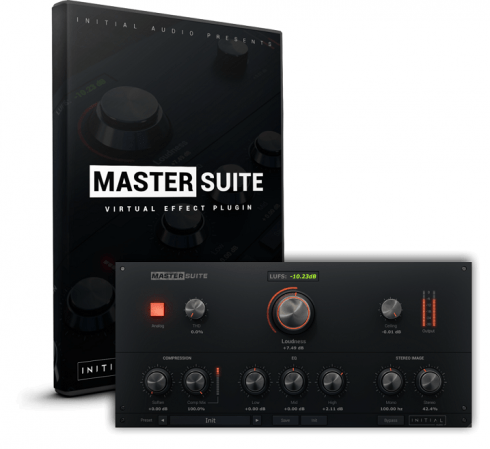
With Master Suite mastering becomes as easy as 1-2-3. Simply adjust the loudness and finalize your track with the 3 band equalizer and stereo image controls. Sending out Songs and Instrumentals to clients, record labels, online stores and streaming services requires them to have a industry standard loudness in order to have a state of the art sound. The LUFS display indicates a industry standard loudness by turning green and warns you when you start getting too loud. An intelligent algorithm applies the right amount of limiting and compression which can be controlled with soften and mix. The HD interface looks clean, feels great and can be seamlessly resized to match your screen resolution.
Mastering Plugin Features
THD: Total Harmonic Distortion, this can ‘fatten’ up the master and help increase the perceived loudness.
Loudness: Increase or decrease the loudness of your master in decibels. Uses an intelligent compression and limiting algorithm to ensure maximum loudness with minimal distortion.
LUFS Meter: The LUFS meter ( Loudness Units relative to Full Scale) is an industry standard representation of perceived loudness. The meter goes green when in the ‘sweet’ zone of a loud master without over compressing the dynamics of your mix.
Soften: This softens the compression curve, also known as a ‘soft knee’.
Mix: Mix the compressed audio with the original. If you are pushing the loudness hard and the master is sounding over compressed with a loss of dynamics, this control can help restore some dynamics while still keeping the master loud.
Analog: Changes the frequency response of master suite to sound more Analog.
3 Band Equalizer: Cut or boost the low, mid and high frequencies by up to 6dB.
Stereo Image: The Mono control works by making the audio completely mono below the set frequency. This can help to tighten up the low end and ensure it is coming only from the center of the stereo field. The Stereo control enhances the stereo field for the frequencies only above the mid range, leaving the lower frequencies untouched. This can be used to add extra ‘space’ in the master by pushing instruments even wider in the stereo field.
Ceiling: Sets the maximum loudness for peaks. Your master will not go louder than this.
Mastering Plugin Features
THD: Total Harmonic Distortion, this can ‘fatten’ up the master and help increase the perceived loudness.
Loudness: Increase or decrease the loudness of your master in decibels. Uses an intelligent compression and limiting algorithm to ensure maximum loudness with minimal distortion.
LUFS Meter: The LUFS meter ( Loudness Units relative to Full Scale) is an industry standard representation of perceived loudness. The meter goes green when in the ‘sweet’ zone of a loud master without over compressing the dynamics of your mix.
Soften: This softens the compression curve, also known as a ‘soft knee’.
Mix: Mix the compressed audio with the original. If you are pushing the loudness hard and the master is sounding over compressed with a loss of dynamics, this control can help restore some dynamics while still keeping the master loud.
Analog: Changes the frequency response of master suite to sound more Analog.
3 Band Equalizer: Cut or boost the low, mid and high frequencies by up to 6dB.
Stereo Image: The Mono control works by making the audio completely mono below the set frequency. This can help to tighten up the low end and ensure it is coming only from the center of the stereo field. The Stereo control enhances the stereo field for the frequencies only above the mid range, leaving the lower frequencies untouched. This can be used to add extra ‘space’ in the master by pushing instruments even wider in the stereo field.
Ceiling: Sets the maximum loudness for peaks. Your master will not go louder than this.

Link 1 - 102 MB
Use 7-Zip if the rar/zip file fails to extract
Zip Password: 123
How to download and install :
1 - Download the program
2 - Disable Windows Defender
Turn off the firewall in Windows so that no crack files are deleted after decompression
3 - Decompress
To decompress the file, you need some simple steps. First download the Winrar program if it is not already on your device, and then you can follow the steps through this article.
4 - installation
Open the installation folder after decompressing and click on the installation file.
0 Comments